Documentation Index
Fetch the complete documentation index at: https://mintlify.com/ByteByteGoHq/system-design-101/llms.txt
Use this file to discover all available pages before exploring further.
What is Scalability?
Scalability is the ability of a system to handle an increased workload without losing performance. More precisely, it’s the system’s ability to handle increased workload by repeatedly applying a cost-effective strategy.Scalability isn’t just about handling more load - it’s about doing so in a financially viable way. A system can be difficult to scale beyond a certain point if the scaling strategy becomes too expensive.
Understanding Scalability
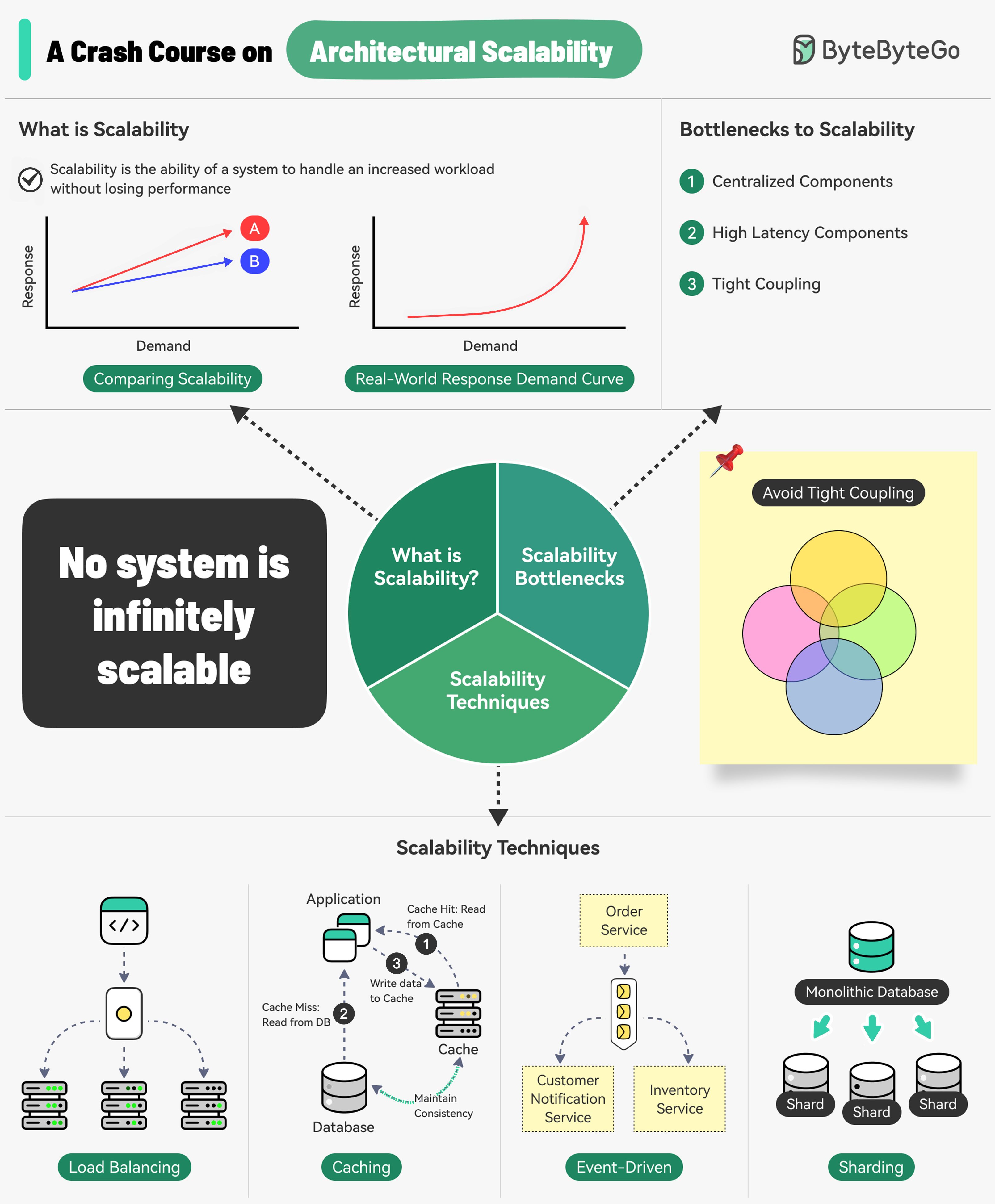 What do Amazon, Netflix, and Uber have in common? They are extremely good at scaling their systems whenever needed.
Three Main Bottlenecks to Scalability
Centralized Components
Can become a single point of failure
High Latency Components
Perform time-consuming operations
Tight Coupling
Makes components difficult to scale
Core Principles for Scalable Systems
8 Must-Know Scalability Strategies
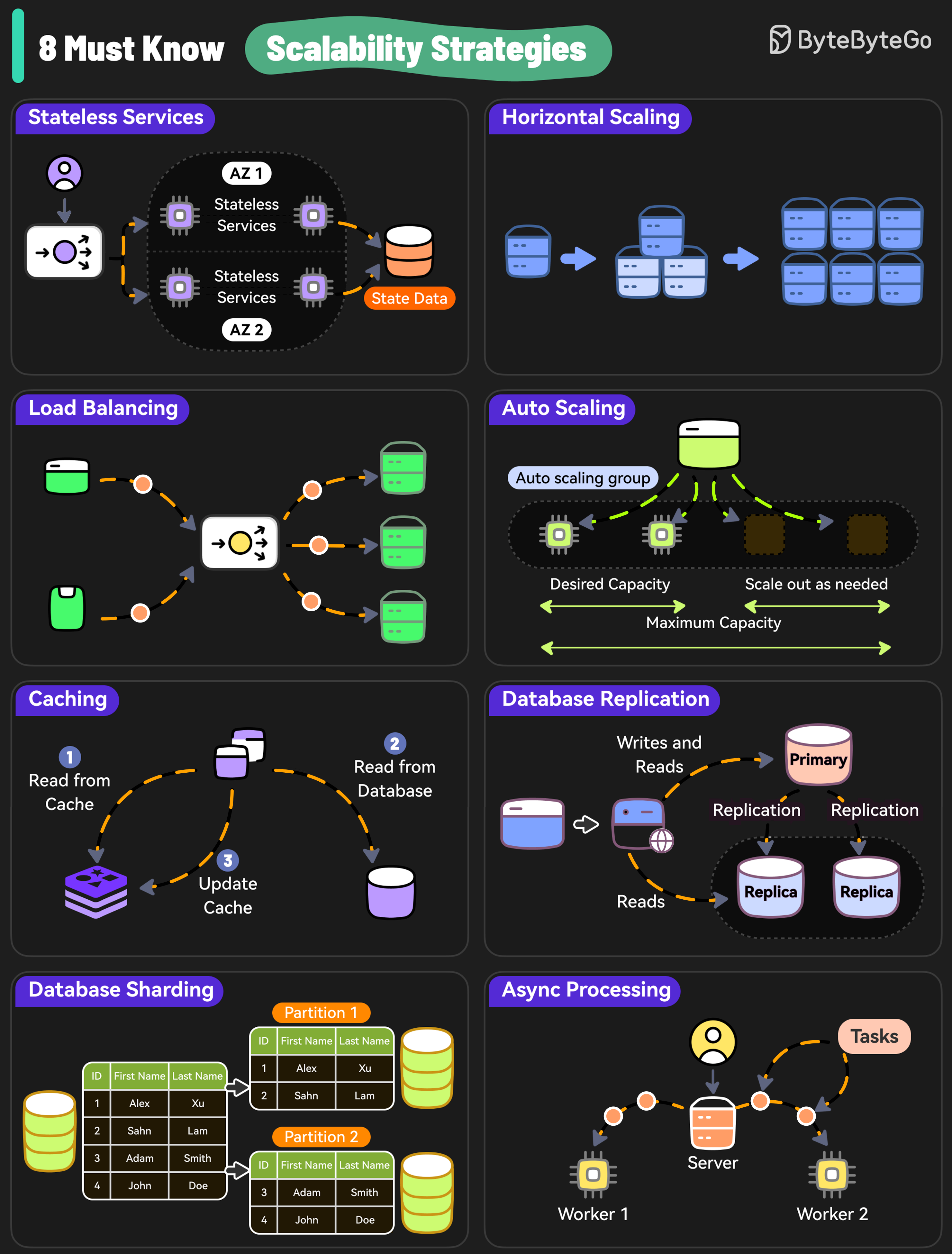 Here are 8 essential strategies to scale your system effectively:
1. Stateless Services
Why Stateless Services Matter
Why Stateless Services Matter
Design stateless services because they don’t rely on server-specific data and are easier to scale.Benefits:
- Any server can handle any request
- Easy to add/remove servers
- Simpler load balancing
- Better fault tolerance
- Store session data in distributed cache (Redis)
- Use JWT tokens for authentication
- Externalize configuration
2. Horizontal Scaling
Add more servers so that the workload can be shared across multiple instances.Horizontal Scaling
Add more machines to distribute load
Vertical Scaling
Add more power (CPU, RAM) to existing machines
- No upper limit on capacity
- Better fault tolerance
- Cost-effective with commodity hardware
- Easier rollback and updates
3. Load Balancing
Use a load balancer to distribute incoming requests evenly across multiple servers, preventing any single server from becoming a bottleneck.
- Round Robin
- Least Connections
- IP Hash
- Weighted Round Robin
- Least Response Time
- Even distribution of traffic
- High availability
- Health checking
- SSL termination
4. Auto Scaling
Implement auto-scaling policies to adjust resources based on real-time traffic.Auto Scaling Strategies
Auto Scaling Strategies
Scaling Triggers:
- CPU utilization
- Memory usage
- Request count
- Custom metrics
- Target Tracking: Maintain a specific metric target
- Step Scaling: Scale by different amounts based on thresholds
- Scheduled Scaling: Scale based on predictable patterns
- AWS Auto Scaling
- Azure Virtual Machine Scale Sets
- Google Cloud Autoscaler
- Kubernetes Horizontal Pod Autoscaler
5. Caching
Caching Layers:- Client-side caching - Browser, mobile app
- CDN caching - Edge locations
- Application caching - Redis, Memcached
- Database caching - Query result caching
- Redis
- Memcached
- Varnish
- CloudFront
6. Database Replication
Replicate data across multiple nodes to scale read operations while improving redundancy.Read Replicas
Handle read queries to reduce primary database load
Primary-Replica
Write to primary, read from replicas
- Improved read performance
- High availability
- Disaster recovery
- Geographic distribution
- Master-Slave replication
- Master-Master replication
- Multi-region replication
7. Database Sharding
Distribute data across multiple database instances to scale both writes and reads. Each shard is a horizontal partition of the data.
Common Sharding Approaches
Common Sharding Approaches
1. Range-based Sharding
- Partition by ID ranges
- Simple but can create hotspots
- Use hash function on key
- Even distribution
- Difficult to add/remove shards
- Partition by location
- Reduces latency
- Supports data compliance
- Lookup table for routing
- Flexible but adds complexity
- Complex queries across shards
- Distributed transactions
- Rebalancing shards
- Maintaining referential integrity
8. Async Processing
Use Cases:- Email sending
- Image/video processing
- Report generation
- Data analytics
- Batch jobs
- Message queues (RabbitMQ, SQS)
- Event streams (Kafka)
- Task queues (Celery, Bull)
- Job schedulers (Airflow, Cron)
Database Scaling Strategies
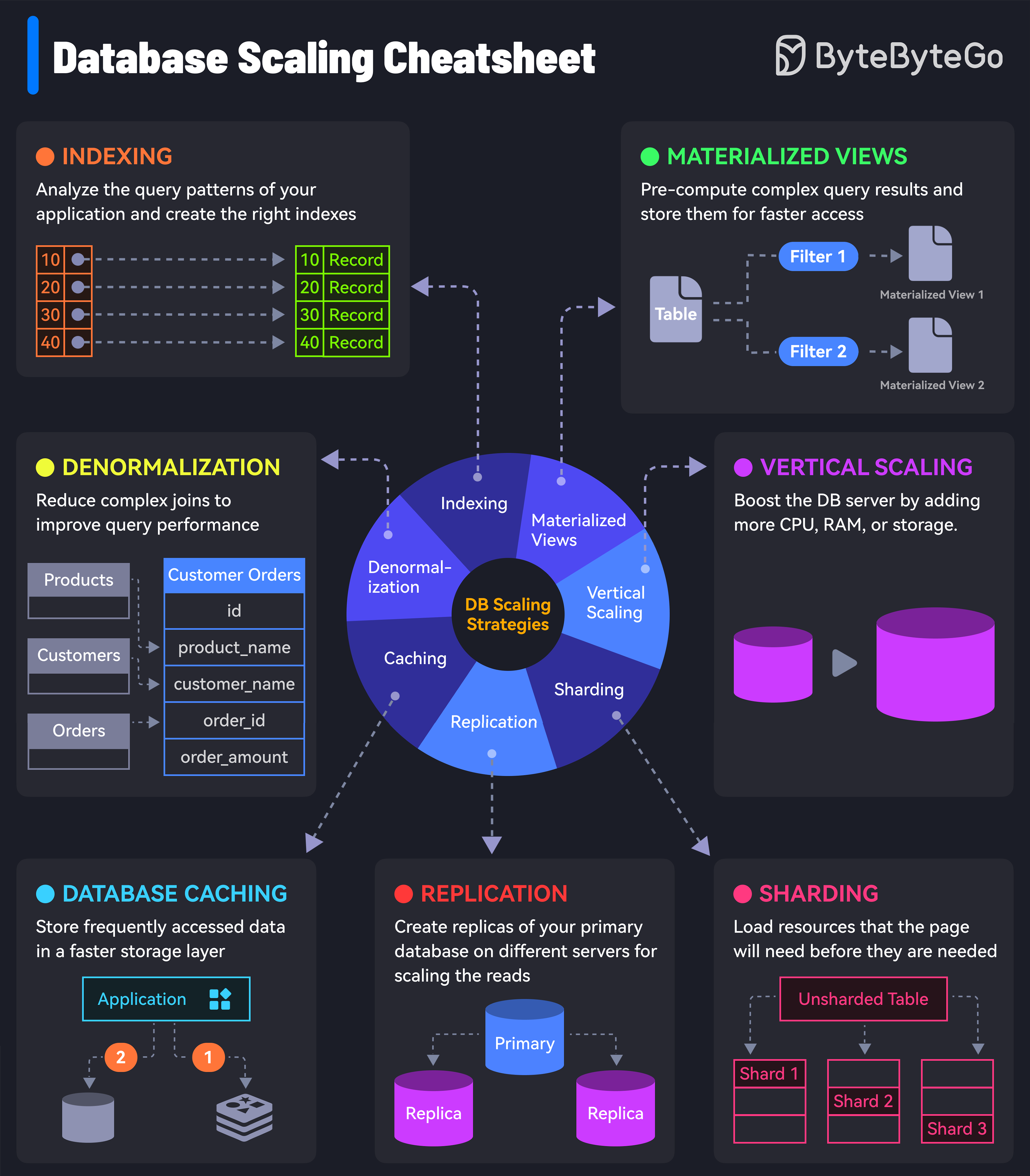
7 Must-Know Database Scaling Techniques
1. Indexing
Indexing Best Practices
Indexing Best Practices
Check the query patterns of your application and create the right indexes.Types of Indexes:
- B-tree indexes (default)
- Hash indexes
- Full-text indexes
- Geospatial indexes
- Index columns used in WHERE clauses
- Index foreign keys
- Avoid over-indexing (writes slow down)
- Monitor index usage
2. Materialized Views
Pre-compute complex query results and store them for faster access. Benefits:- Faster query performance
- Reduced computation load
- Better for complex aggregations
- Additional storage required
- Need refresh strategy
- Potential staleness
3. Denormalization
Reduce complex joins to improve query performance by storing redundant data.
- Read-heavy workloads
- Complex joins impacting performance
- Data that changes infrequently
- Data consistency challenges
- Increased storage
- Update complexity
4. Vertical Scaling
Boost your database server by adding more CPU, RAM, or storage. Limitations:- Hardware limits
- Expensive at scale
- Downtime during upgrades
- Single point of failure
5. Caching
Store frequently accessed data in a faster storage layer to reduce database load. Caching Strategies:- Cache-aside
- Write-through
- Write-behind
- Refresh-ahead
6. Replication
Create replicas of your primary database on different servers for scaling reads.7. Sharding
Split your database tables into smaller pieces and spread them across servers. Used for scaling both writes and reads.Scaling from One to Millions of Users
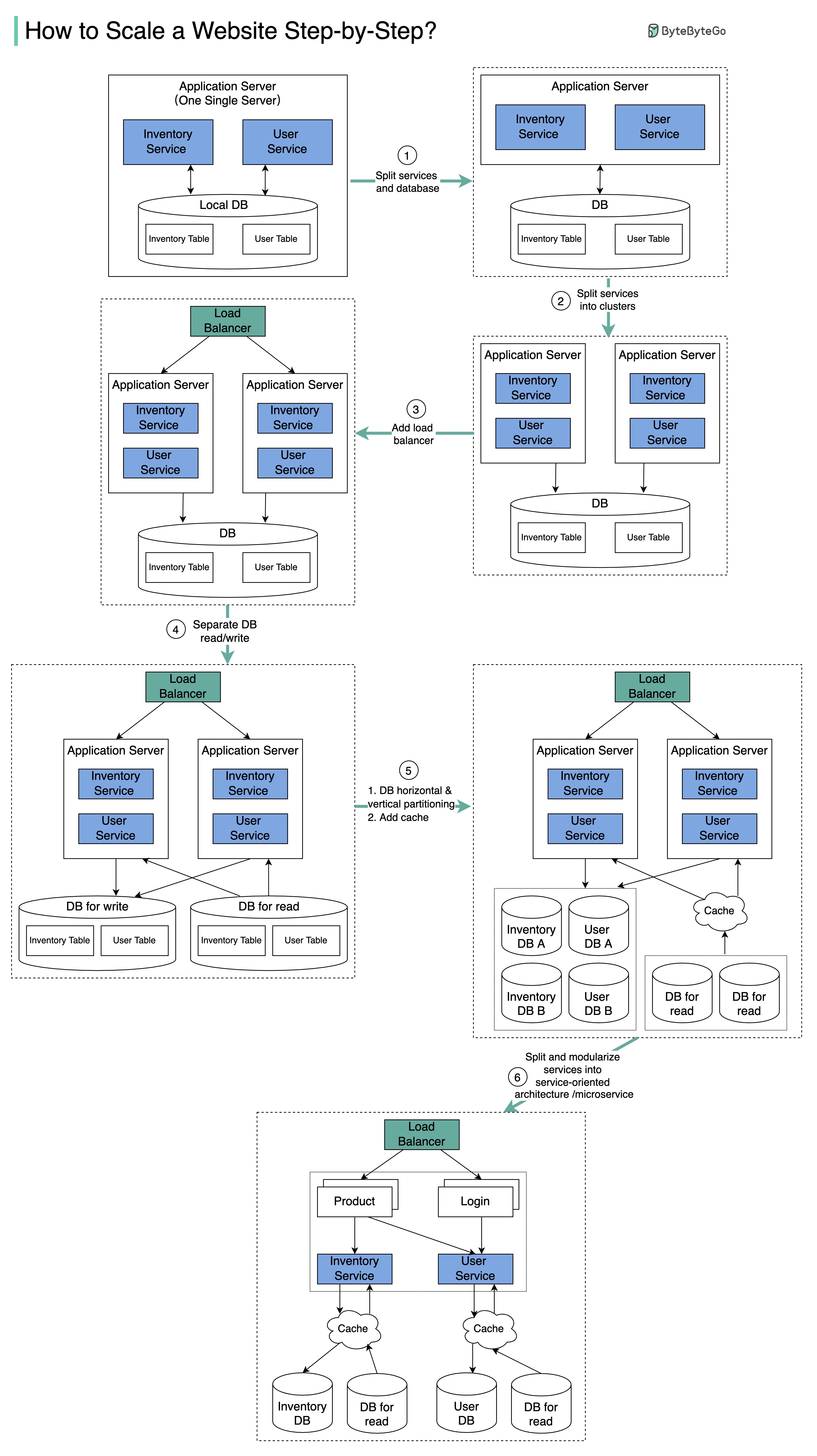 The diagram illustrates the evolution of a simplified eCommerce website from a monolithic design on a single server to a service-oriented/microservice architecture.
Step 1: Separate Application and Database
Initial Separation
Initial Separation
With the growth of the user base, one single application server cannot handle the traffic anymore.Solution: Put the application server and database server on separate servers.Benefits:
- Better resource allocation
- Independent scaling
- Improved security
Step 2: Application Server Cluster
The business continues to grow, and a single application server is no longer enough. Solution: Deploy a cluster of application servers.Step 3: Load Balancer
Now the incoming requests have to be routed to multiple application servers. How can we ensure each application server gets an even load? The load balancer handles this perfectly.
Step 4: Database Read Replicas
With business continuing to grow, the database might become the bottleneck. Solution: Separate reads and writes so that frequent read queries go to read replicas. Benefits:- Greatly increased throughput for database writes
- Reduced load on primary database
- Better performance
Step 5: Horizontal Partition and Caching
One single database cannot handle the load on both the inventory table and user table.Vertical Partition
Add more power to the database server (has hard limits)
Horizontal Partition
Add more database servers
Caching Layer
Offload read requests
Step 6: Microservices Architecture
Benefits:- Independent deployment
- Technology flexibility
- Team autonomy
- Better fault isolation
- Easier scaling
Common Scalability Techniques Summary
Load Balancing
Spread requests across multiple servers to prevent bottlenecks
Caching
Store commonly requested information in memory
Event-Driven Processing
Use async processing for long-running tasks
Sharding
Split large datasets into smaller shards for horizontal scalability
Performance Optimization
Reduce Latency Strategies
Top 5 Strategies to Reduce Latency
Top 5 Strategies to Reduce Latency
- Use CDN - Serve static content from edge locations
- Optimize Database Queries - Add indexes, optimize joins
- Implement Caching - Multiple layers of caching
- Async Processing - Move work to background
- Connection Pooling - Reuse database connections
System Design Trade-offs
Common Trade-offs:
- Consistency vs. Availability (CAP theorem)
- Latency vs. Throughput
- Read vs. Write Performance
- Cost vs. Performance
- Complexity vs. Maintainability
Monitoring and Observability
Key Metrics to Track
Response Time
Track latency at different percentiles (p50, p95, p99)
Throughput
Requests per second (RPS)
Error Rate
Percentage of failed requests
Resource Utilization
CPU, memory, disk, network usage
Logging and Tracing
Best Practices
Start Simple
Don’t over-engineer initially. Scale when you need to.
Measure Everything
You can’t optimize what you don’t measure.
Plan for Failure
Design systems to be resilient to failures.
Automate Scaling
Use auto-scaling to handle traffic spikes.
Test at Scale
Load test before production traffic hits.
Common Pitfalls to Avoid
What NOT to Do
What NOT to Do
Premature Optimization:
- Don’t scale before you need to
- Measure first, optimize later
- Start with vertical scaling if appropriate
- Keep it simple initially
- Add complexity only when necessary
- Consider operational overhead
- Profile and identify real bottlenecks
- Don’t assume - measure
- Fix the biggest bottleneck first
- Everything fails eventually
- Design for graceful degradation
- Implement proper monitoring
Next Steps
Software Architecture
Learn architectural patterns for scalability
Microservices
Scale with microservices architecture
Design Patterns
Apply patterns for scalable systems